Export options
Context menu Esporta come file di immagine... in the fabric view
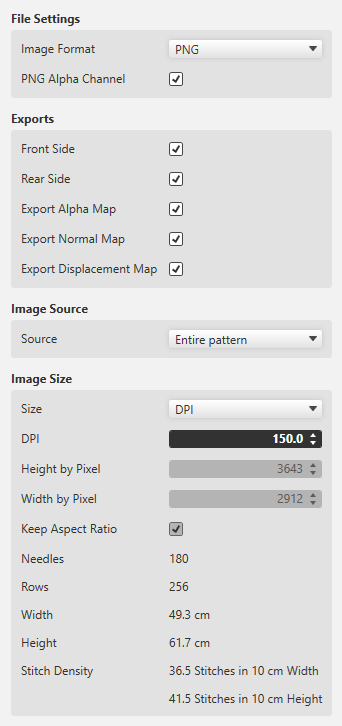
Formato immagine
-
PNG with and without transparency
 Export the fabric view for further processing to a 3D apparel software always as PNG with enabled transparency (Canale alfa PNG).
 -
JPG with specification of the quality
The fabric view as JPG is always exported with a black background.
Esportazioni (Variants)
So-called Maps are used for the 3D visualization and 3D simulation to assign two-dimensional images to the three-dimensional surfaces of the models.
The different types of Maps give a more detailed and realistic appearance to the computer generated 3D models.
- Lato anteriore
- Lato posteriore
-
Mappa alfa
An alpha Map contains information about transparent areas of a texture.
In a 3D software it is required to define the transparent space. - Mappa normale
- Also referred to as Bump Map.
- The Normal Map specifies the angle, with which virtual light is reflected over a digital surface.
- With it the appearance of the texture depth is simulated.
- The Normal Map is a necessary part of digital textures in a 3D software.
- Mappa spostamento
- Also referred to as Height Map.
- A Displacement Map can artificially generate an additional height of a digital texture.
- This way, a more realistic appearance of three-dimensional surface structure results within a 3D model.
Origine immagine
-
Intero disegno
Select, if a complete fabric is to exported. -
Zona selezionata
Exports only the desired, selected section of a pattern.
This function is helpful in case cycles are to be used in a 3D apparel software. - Sezione dell'immagine corrente
- Exports only the area that currently appears in the document window of the fabric view.
- Mantieni proporzioni
- The size ratio of the pattern is maintained.