Status Bar of the Lined Shape
Status bar of the lined shape

In the left area of the status bar are displays that refer to the cursor position.
|
|
Display of the cursor coordinates. |

You can make layout settings for the document window in the right area.
|
|
Mostra asse di simmetria |
|
|
Mostra griglia delle maglie |
|
|
Mostra assi del diagramma |
|
|
Mostra dimensionamenti di controllo |
|
|
Mostra simboli dei punti di marcatura |
|
|
Nascondi zone di lavoro |
|
|
Mostra zone di lavoro |
|
|
Mostra zone di lavoro (colore del filato) |
|
|
Mostra zone di lavoro (colore CA) |
|
|
Spostare l'oggetto selezionato (punto di taglio, punto di marcatura, zona di lavoro o elemento di taglio) con i tasti di direzione della tastiera (punto di taglio solo nel formato input maglie) |


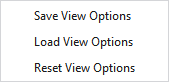
Make the following settings in the context menu of the status bar:
|
Salva la visualizzazione |
Saves the current settings of the status bar as default. New lined shape projects will appear with the saved default settings. |
|
Carica rappresentazione |
Loads the default settings of the status bar. |
|
Reimposta la visualizzazione |
Resets the settings of the status bar and the default setting to the STOLL default. |
Vedi anche
- Working in the line table or in the document window (graphic)
- Fully Fashion-Pattern: Front with V-neck and Structure
- Fully Fashion-Pattern: Front with V-neck and Binding-off
- Fully Fashion-Pattern: Front with neckline and shoulder gore by types of shape elements
- Fully Fashion-Pattern: Back with French Shoulder
- Fully Fashion-Pattern: Fabric Piece with Multi-step Widening and Multi-step Narrowing
- Fully Fashion-Pattern: Front with V-neck and dart type of shape element
- Fully Fashion-Pattern: Front with V-neck and Knitting Ranges