Control Column Data (Replace / Exchange)
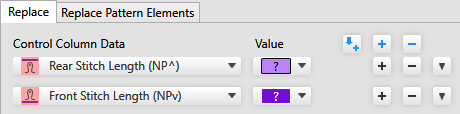
 The description of the settings for Scambia, corresponds to the same for Sostituisci, unless it is expressly indicated.
|
Dati colonne di comando |
Select the control column that is to be entered. All control columns available for the machine type can be selected, even if they do not contain entries in the pattern. |
|
Valore |
Enter a value that is to be inserted. All entries that are defined in the Dati Setup as Impostazione predefinita are offered for selection.
|
|
|
Adds the current search criteria for Dati colonne di comando and Dati dell'ago to the already defined criteria for insert. |
|
|
Adds the current cursor attribute to the already defined criteria for insert. This action affects all criteria for insert, not only Dati colonne di comando.
|
|
|
Deletes all criteria for insert. |
|
|
Adds an input line for a new criterion for insert. |
|
|
Deletes the corresponding input line. |
|
|
Moves the criterion for insert to the needle data.
If the stitch length is selected in the control columns data, then the entry is affected in the control column with Find and Replace. |

 The values
  With the

 Select the attribute in the pattern that is to be inserted and then click on this button, to rapidly define the criteria for insert.


