Generation of a Color Arrangements
Generation of a Color Arrangement from a selection:
- 1
- Draw a design pattern with the necessary colors:
-
Cores de fio
-
Cores de depósito
-
Cores de guia-fios
- 2
- Select the desired rows in the Fileira control column.
- 3
- Position the cursor in the pattern area.
- 4
- Call up the Seleção
/ Criar um Color Arrangement...
context menu.
- or -
Click directly the  button in the ribbon.
- The Color Arrangement Editor will be opened.
- The selected pattern rows are searched from left to right for existing colors.
These colors will be created as color segments in the Color Arrangement Editor and in the search area the search colors are displayed with the  column attribute.
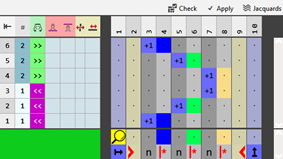
- 5
- Make the desired entries in the editor with the tools for Color Arrangements from the CA and Ações da agulha / Cores tabs.
- 6
- Check the generated Color Arrangement on correct entries with the
 Manual button.
 : The knitting procedure cannot be checked!
- 7
- If necessary, in case of a Color Arrangement already used in the design pattern, apply the changes to the basic pattern with the
 Aceitar button.
- or -
Close the tool window with  button.
- 8
- Close the prompt with the desired button:
-
Save: Color Arrangement is saved locally in the
 CA tool window.
 -
Reject: The changes will not be saved.
-
Copy: The changed Color Arrangement is saved as copy in the CA tool window.
- 9
- Enter the generated Color Arrangement via the
 control column into the desired rows of the design pattern.
- The Color Arrangement is expanded by the technical processing.