Behavior of a Tile with Technical Processing
Example for knitting-in: Knitting-in Float-Tuck, Binding Tuck
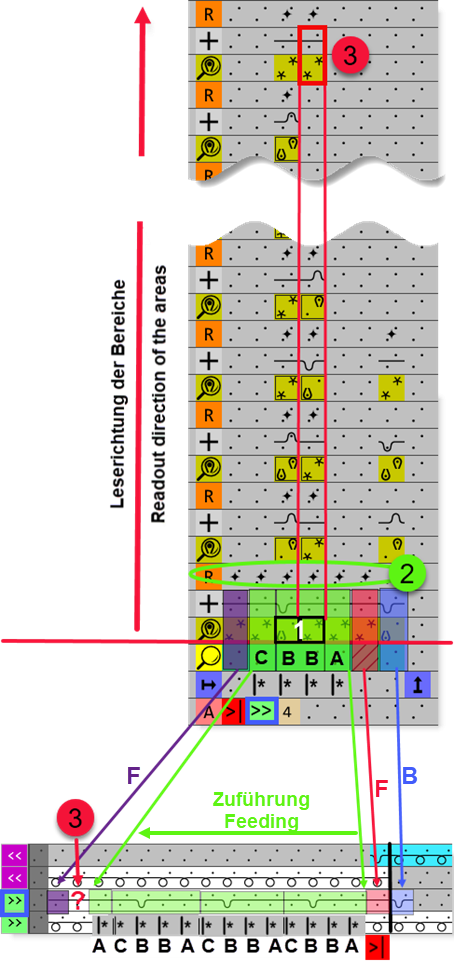
For the corresponding situation, the appropriate tile is found using defined attributes ( Símbolos na fileira de atribuição) in the knitting element and inserted in the design pattern during the technical processing.
|
| |||
|
|
| ||
|
| |||
|
Order of the insertion based on the search row and the search rows for needle occupancy | |||
|
| |||
|
1st step: |
B |
Structure |
First of all the binding is entered once in the neighboring color field. |
|
2nd step: |
F |
Fix areas |
|
|
3rd step: |
|
Feeding |
Then the repetition
On this needle, the needle occupancy group 1 should be inserted with a width of 2 needles. As the information from group 1 cannot be entered, now, the right column is searched row by row until an appropriate needle occupancy is found. This needle action will be inserted then at position ?. |
|
2 |
|
Reference row with the
| |


 column, e.g.. 4 columns in the
  are defined with
 : Reading order:
 definition of areas is inserted on the first needle at the right side of the color field
