Edit and modify inserted Jacquards
I. Edit the inserted Jacquards:
- In the pattern there are areas with inserted Jacquard modules.
- 1
- In the Início ribbon under
 Janela de ferramentas, open the
  Jacquards tool window.
- or -
Open the context menu in the Jacquard area in the pattern and click . und Abrir Jacquards...
. - The Jacquards tool window is opened.
|
| |||
|
1 |
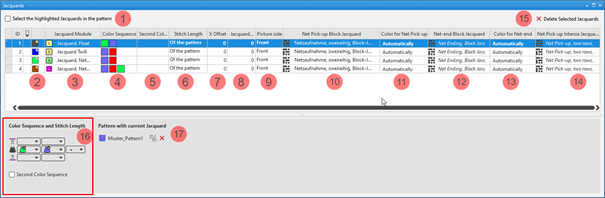
Selecionar as entradas das tabelas selecionados na amostra | ||
|
|
The Jacquards selected in the table are not displayed as selection in the pattern. | ||
|
|
The Jacquards selected in the table are displayed as selection in the pattern. | ||
|
ID |
Running numbering of Jacquard areas | ||
|
2 |
|
For drawing a Jacquard module in the pattern
| |
|
|
Index Color: Application in the search area of a Color Arrangement
| ||
|
3 |
Display of the Jacquard module in use
| ||
|
4 |
Display for the color sequence for the first and second pattern row if | ||
|
5 |
Display for the color sequence for the second pattern row if | ||
|
6 |
Specification of the stitch length which is to be used in the pattern.
| ||
|
7 |
Value in needles for the horizontal offset of a Jacquard module | ||
|
8 |
Value in needles, regarding how much the Jacquard back side is to be narrower compared to the picture side. | ||
|
9 |
Picture at the front / rear / front-rear | ||
|
10 |
Display of the knitting elements in use for the net pick-up with continuous Jacquards | ||
|
11 |
Specification of the color (yarn carrier) which is used for the net pick-up knitting element | ||
|
12 |
Display of the knitting elements in use for the net ending with continuous Jacquards | ||
|
13 |
Specification of the color (yarn carrier) which is used for the net ending knitting element | ||
|
14 |
Display of the knitting elements in use for the net pick-up with intarsia with Jacquard back | ||
|
15 |
Eliminar Jacquards selecionados |
The selected Jacquard is deleted in all the pattern where it is in use. | |
|
16 |
Color Sequence and Stitch Length | ||
|
|
Display or edit box for the stitch length per color / system for rear needle bed
| ||
|
|
Display of the color sequence from the left for the Jacquard area selected in the table | ||
|
|
Display or edit box for the stitch length per color / system for front needle bed
| ||
|
Color Sequence of Second Pattern Row | |||
|
|
|
Default setting | |
|
|
Definition of the color sequence for the second pattern row is possible.
| ||
|
17 |
List of the patterns, where the Jacquard selected in the table is in use.
| ||
|
|
Ungroup the grouped Jacquard areas.
| ||
|
|
The Jacquard module inserted in the pattern will be removed from the area in the pattern.
Result:
| ||

 : Selection via the first column in the table.

 (
(


- 2
- Select the Jacquard to be changed in the table.
- 3
- Make the desired changes in the tool window.
- 4
- Close the tool window with X.
- The changes will be applied to the pattern.