Raster-Shape Symbols
Símbolos de forma
Início tab -> Janela de ferramentas -> Símbolos de forma
In the Símbolos de forma tool window select the shape symbols to draw.
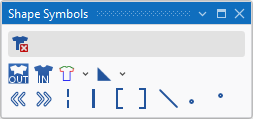
|
|
Eliminar dados da forma Can be selected in addition (with the CTRL key pressed) to a shape symbol. Only the selected shape symbol is deleted when drawing. All the other shape symbols are retained. |
|
|
Fora da forma |
|
|
Dentro da forma |
|
|
Cantos de forma (F2)
|
|
|
Marcações de forma
|
|
|
Alinhar para a esquerda |
|
|
Alinhar para a direita |
|
|
Aplicar Spickel |
|
|
Separação |
|
|
Preencher decote |
|
|
Preencher decote |
|
|
Ocultar |
|
|
Graduação no canto de forma à frente |
|
|
Graduação no canto de forma atrás |


 A selected shape symbol overwrites the existing shape symbols when inserting it into the pattern. You can enter it additionally with the CTRL key pressed. You can remove it by the CTRL-ALT key.