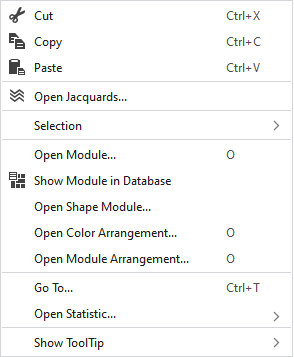
Context Menu of the Symbol View
|
|
Elimina o conteúdo da seleção e copia o mesmo na área de transferência. | |
|
|
Copia o conteúdo da seleção para a área de transferência. | |
|
|
Cola elementos copiados ou cortados na posição selecionada. | |
|
|
Opens the Jacquard setting of the cursor position in the tool window Jacquards. | |
|
Seleção |
Criar módulo de estrutura... |
Create a structure module from the selection |
|
Select |
The functions of the menu bar Seleção are also available in the context menu. | |
|
Correção de grupos de graduações (NPGK) |
Manage the correction of stitch length groups (NPGK) of the selected area. | |
|
Abrir módulo... |
Opens the module at the cursor position.
| |
|
|
Shows the module at the cursor position in the database. | |
|
Abrir módulo de forma... |
Opens the shape module at the cursor position. | |
|
Abrir Color Arrangement... |
Opens the Color Arrangement at the cursor position.
| |
|
Abrir Module Arrangement... |
Opens the Module Arrangement at the cursor position.
| |
|
Ir para... |
Enter | |
|
Open Statistics |
Open the Statistics dialog box. | |
|
Exibir descrição |
|
Activates the tooltip in the needle area. |
|
|
Activates the tooltip in the needle area, as well as a preview of the modules. | |
|
|
Activates the tooltip in the control columns. | |
|
|
Activates the tooltip in the control columns as well as a preview of CA and MA. | |


 Position the cursor on a module in the pattern and press the


