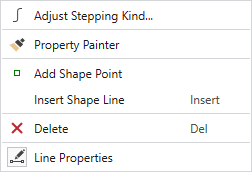
Context Menu of Shape Lines
|
|
Determine the properties of the curve. Clicking on it, opens the tool window where you select the stepping kind and make the corresponding settings.
|
|
|
Copia as propriedades do objecto (linha de corte ou ponto de marcação), no qual você clica e as transfere para o objecto que você clica a seguir. |
|
|
Insere um ponto de corte. |
|
Inserir linha de corte |
Inserir linha de corte depois |
|
|
Elimina o objecto no qual você clica na vista. |
|
|
Opens the Propriedades de linha dialog box. |

 Only available with lined shape


 Shape points can be moved with the left mouse button or with the cursor keys.
Multiple shape points can also be moved together by selecting them previously with a pressed CTRL key.