Needle Data (Find)
|
Dados de agulha
|
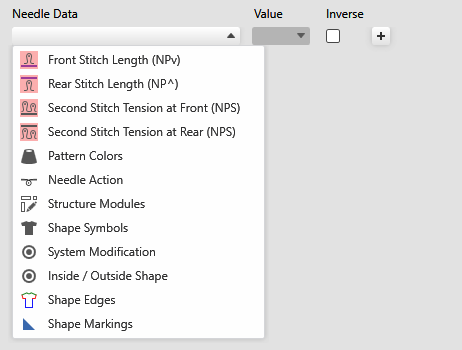
Select the needle data in the drop-down menu that are to be searched. Depending on the selection different settings options are offered. |
|
Valor |
Enter a value that is to be searched. |
|
Inverso |
Inverts the selection of the selected data. |
|
|
Adds an input line for a new search criterion. You can define various search criteria at the same time. |
|
|
Deletes the corresponding input line. |
|
|
Moves the search criterion to the control columns data.
If the stitch length is selected in the control columns data, then the entry is affected in the control column with Find and Replace. |


 Only possible with stitch length.
|
|
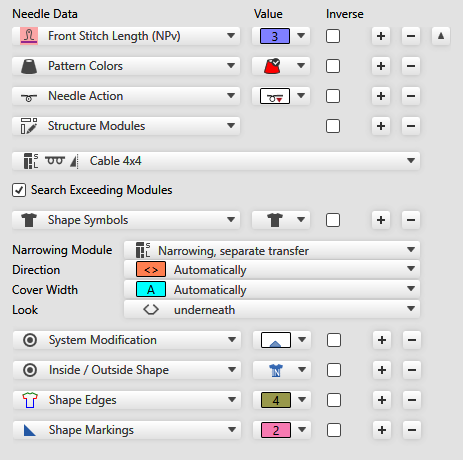
Select the value for the stitch length. When searching for entries of the stitch length in the search area Needle Data, only needle-exact NP entries are searched for.
|
|
|
Select the pattern color. |
|
|
Select the Ação de agulha in the drop-down menu. |
|
|
Select the structure module. All structure modules that are available in the Módulostool window, are offered for selection. |
|
If modules that were partially overwritten can be found in the pattern, then these modules are taken into account and replaced.
Only complete existent modules are replaced.
| |
|
|
Select the shape symbol or the module type. If you select a module type, depending on the selection appear additional menus for Direção, Largura de superposição and Aspecto . |
|
|
Select the symbol for not sinking or devoré. |
|
|
Select the symbol for inside or outside shape. |
|
|
Select the shape edge. |
|
|
Select the shape marking. |


 With S-machines it is also possible to search for the second stitch tension.


 This setting does not apply to modules that are cut into by the selection or the shape, but were actually partially overwritten.


