Context Menu of Pattern Elements
|
|
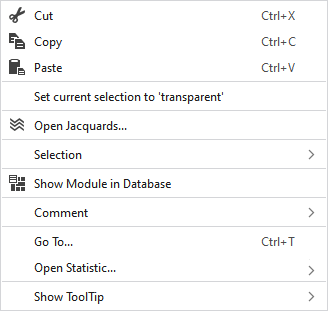
Elimina o conteúdo da seleção e copia o mesmo na área de transferência. | |
|
|
Copia o conteúdo da seleção para a área de transferência. | |
|
|
Cola elementos copiados ou cortados na posição selecionada. | |
|
Definir seleção atual como 'transparente' |
Sets the selected area in the pattern element to transparent. | |
|
|
Opens the Jacquard at the cursor position in the Jacquard table. | |
|
Seleção |
Criar um Jacquard... |
Generate a Jacquard area in the selected area.
|
|
Select |
The functions of the menu bar Seleção are also available in the context menu. | |
|
Proteger |
A selection can be protected from interventions. | |
|
|
Shows the module at the cursor position in the Module Explorer. | |
|
Comentário |
Place a pin, comment, or graphic anywhere in the pattern. | |
|
Ir para... |
Opens the Ir para dialog box.
| |
|
|
Entry in Fileira | |
|
|
Entry in Fileira | |
|
|
Enter the Fileira you want to jump to. | |
|
|
Enter the Coluna you want to jump to.
| |
|
|
The jumped to result is selected. | |
|
Exibir descrição |
|
Activates the tooltip in the needle area. |
|
|
Activates the tooltip in the needle area, as well as a preview of the modules. | |
|
|
Activates the tooltip in the control columns. | |
|
|
Activates the tooltip in the control columns as well as a preview of CA and MA. | |
|
|
The coordinates of the drawing are shown when drawing. | |


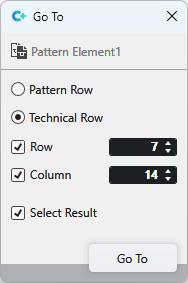

 refers to a
 With row and column enabled, the position with the corresponding coordinates is jumped to.
