Context menu on the knitting elements
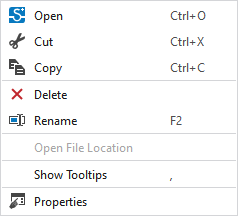
You make the following settings in the context menu on the knitting elements:
|
|
Open the selected knitting element.
|
|
|
Cut-out the selected knitting element.
|
|
|
Copy the selected knitting element to the clipboard. |
|
|
Remove the selected knitting element or pattern element.
|
|
|
Rename the selected knitting element.
|
|
Abrir caminho de arquivo |
Open the folder via the Depósito de elementos de tricotagem path. |
|
Exibir descrição |
Display ToolTip on the knitting elements. |
|
Propriedades |
Display Propriedades tool window.
|

 Only possible for private knitting elements.


