Working with the racking correction (VCI)
Open Correção do variador (VCI) and change the entry in the local knitting element:
- The
 Correção do variador (VCI) control column is displayed.
- 1
- Open the desired local knitting element with double-click, e.g. Trança 3x3.
- 2
- Open the selection list in the Início ribbon at
 Janela de ferramentas
  and select
  Dados de setup.
- or -
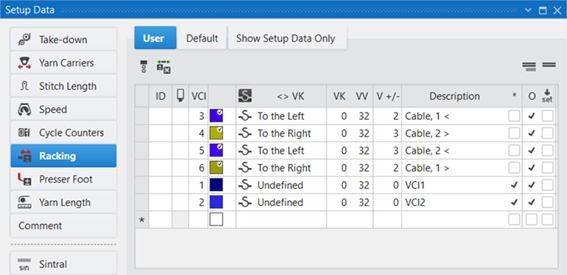
Click the Dados de setup symbol directly under Parâmetros. - The Dados de setup tool window appears.
- 3
- Select the Predefinição tab for the selection of an 'unused' entry.
- or -
Select the Usuário tab for the selection of an 'used' entry. - 4
- Select the desired racking correction index in the
 column and enter it in the knitting element, in the Correção do variador (VCI) control column of the technical row for 'transfer'.
Options in the toolbar
|
|
Selecting the default value to enter in the control column |
|
|
Deleting an entry in the control column |
|
|
Show Pattern-related Values |
|
|
Hide Pattern-related Values |


Meaning of Columns of the Correção do variador (VCI) Table
|
Column |
Display |
Setting range | |
|---|---|---|---|
|
ID / IDv / ID^ |
Consecutive numbering and sorting of the entries | ||
|
|
Selecting the line to enter it in the control column | ||
|
VCI |
Index for the indirect allocation of the racking correction |
VCIn | |
|
Color |
Display of colors to enter in the control columns | ||
|
|
The column is displayed only in the Usuário tab | ||
|
|
Lines (entries) newly added in the Usuário tab | ||
|
|
Racking correction index from the Predefinição tab | ||
|
<> VK |
Direction of the racking correction
|
n = A – Z < = to the left > = to the right | |
|
VK |
Racking correction value |
m = 0 -10, ? ? = undefined value m = 0: No correction | |
|
VV |
Racking speed |
VV = n | |
|
V +/- |
Overracking
|
V+/- n | |


|
Column |
Display | |
|---|---|---|
|
Description |
Comment on the use of the entry. | |
|
* |
|
Entry is not defined as favorite, meaning the entry is only within the Predefinição table available. |
|
|
Entry is defined as favorite, meaning the entry is available within the Usuário table or directly via the context menu of the control columns. | |
|
O |
|
Value cannot be overwritten (Overwrite) by a value of another table. |
|
|
Value can be overwritten (Overwrite) by a value of another table. (Default) | |
|
|
|
The entry will not be applied to the Setup data
|
|
|
The entry will be applied to the Setup data.
| |
|
G |
|
All settings of the Predefinição or Usuário table are STOLL defaults (STOLL Template).
|
|
|
These settings of the Predefinição or Usuário table are now User Standards (User-Template)
| |

 : All entries used in the pattern are applied by default to the Setup data.