Distances of the Line
Make the following settings in the Distâncias da linha dialog box:
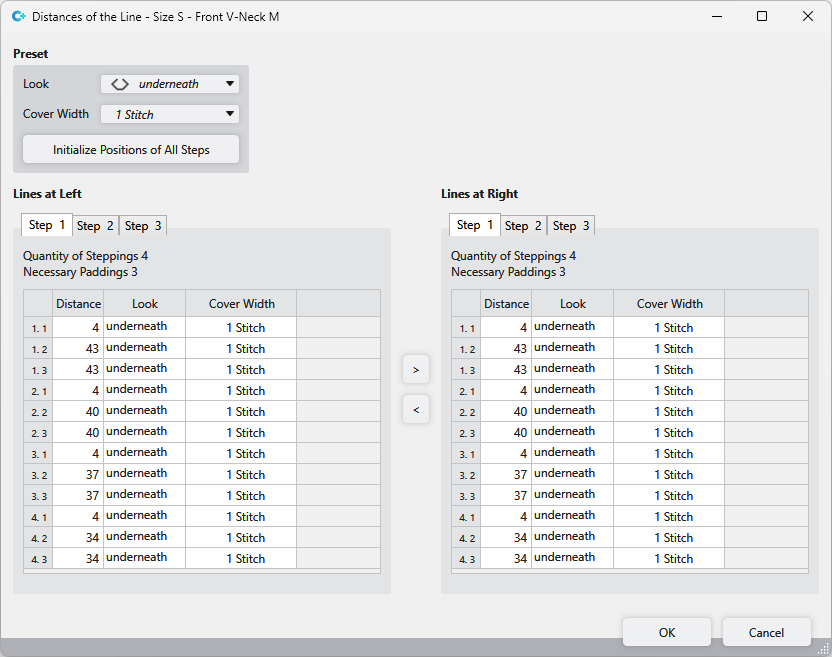
|
Predefinições |
Shows the specifications for the line. |
|
Aspecto |
Select the look.
por baixo or |
|
Largura de superposição |
Select cover width:
1 Malha or |
|
Inicializar posições de todos os passos |
Initializes the positions of the steps. |

|
Linhas esquerdas |
Settings of the distances and steppings for the multi-step narrowing of the left line. |
|
Linhas direitas |
Settings of the distances and steppings for the multi-step narrowing of the right line. |
|
S. 1 / S. 2 / S. 3 / S. 4 |
Make settings for the different steps. The steps correspond to the sub-lines for this line in the |
|
Número de passos |
Shows the quantity of steps of the selected stepping. |
|
distâncias necessárias |
Shows the quantity of narrowing markings in the selected stepping. |
|
First column |
Numbering of the entries. The first number corresponds to the step in the selected stepping. The second number, after the point, corresponds to the position of the respective narrowing marking of this stepping. The count starts from the middle outwards. |
|
Distância |
Shows the distances between the narrowing markings of a stepping. |
|
Aspecto |
Shows the appearance of each narrowing marking. |
|
Largura de superposição |
Shows the cover width of each narrowing marking. |

Buttons between the lines:
|
|
Mirror the setting of the stepping selected on the left onto the corresponding stepping on the right. |
|
|
Mirror the setting of the stepping selected on the right onto the corresponding stepping on the left. |

