Technique (Ribbon Group)
Início tab -> Técnica group
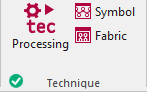
Run the following functions in the Técnica ribbon group:
|
|
Processamento Iniciar o processamento técnico da amostra ativa. |
|
|
Símbolo Controlar e corrigir a amostra após técnica. As alterações se perdem após processamentos técnicos repetidos. |
|
|
Tecido Controlar a amostra após técnica com base à representação de malhas próxima à realidade. Você não pode editar esta pré-visualização. |


 Before the Processamento técnico the
  Símbolo and
  Tecido icons are greyed out.
After the Processamento técnico the icons appear with color. In the bottom left of the group appears the  OK icon.
If you edit the processed symbol view after the Processamento técnico, appears the  Pin icon, in the bottom left of the Técnica group.
If you edit the unprocessed symbol view after the Processamento técnico, appears the  Outdated icon, in the bottom left of the Técnica group.
If any errors occur in the Processamento técnico, they are displayed in the message line inside the document window.
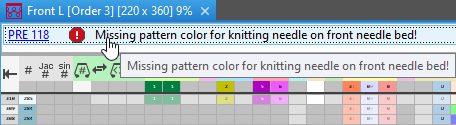
Click on the error message in order to get more information about the error cause, its position in the pattern and a possible remedy.
- The Processamento técnico will be canceled with severe errors.
The error messages are marked with a red icon.
icon. - Warnings are marked with a yellow icon.
The Processamento técnico is continued.