Create the formula for the stripe height
The formulas that are not contained in the Raglan shape type by default can be entered in the Formula table.
|
Label |
Formula |
|---|---|
|
Stripe Height |
[Length] / 20 |
- 1
- Select the
 symbol in the Parameter ribbon.
 - 2
- Go to the Formula table.
- 3
- Open the context menu of the Row No. column.

- 4
- Select .
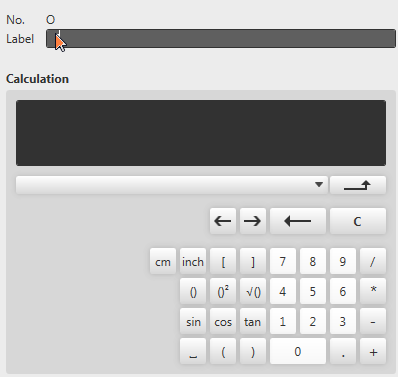
- The pop-up window Formula Editor appears.
- 5
- Enter the text Stripe Height as label.
- 6
- Select and insert the Length dimension in the list box.

- 7
- Click on the / button.
- 8
- Click the 2 and 0 buttons.
- The entry in the Calculation field is [Length]/20.
- 9
- Confirm with
 .
. - The Formula Editor closes.
- A row with the Stripe Height formula is added at the bottom of the Formula table.