Create a Formula for the Collar Width
How to calculate the collar width:
The collar width is calculated as the sum of the front and rear collar width.
How to create the formula:
- The Dimensions
 tool window is open.
- 1
- Open the context menu of the Row No. column of the Formula table.

- 2
- Select .
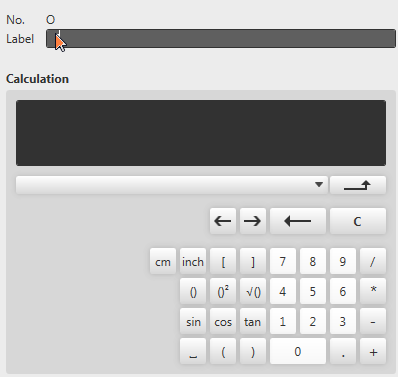
- The pop-up window Formula Editor appears.
- 3
- Enter the text Collar Width as label.
- 4
- Select the dependent dimension Collar Width at the Front in the list field.

- The entry in the Calculation field is: [Collar Width at the Front]
- 5
- Click the + button.
- 6
- Select the dependent dimension Collar Width at the Back in the list box.
- The entry in the Calculation field is:
[Collar Width at the Front]+[Collar Width at the Back] - 7
- Confirm with
 .
. - The Formula Editor closes.
- A row with the Collar Width formula is added at the bottom of the Formula table.