Backstage View
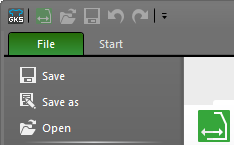
In the backstage view you manage your ( ) shape files and make the corresponding settings.
- Create New, Open, Save and Close
 Save
Save
Saves the current state of editing. Save as
Saves the current state of editing under a new name or path. Open
Open
Opens an existing ( ) shape file.-
 Import Shape
Import a shp shape (stitches) from the M1plus to the dimensioned shape
How to import a shape from the M1plus -
Print tables and graphics of the shape file - Make basic settings and enter information for the current file
- Configuration
Basic settings for the current shape file - Information
Information about history, use and further processing -
Recent
Lists the files and folder recently opened by this program. Recent Files and Folders
 -
New
Opens the New tab - Configure the software and get support
- Support
Information about the software release, your credit and contact to Stoll - Options
Basic settings for new shape files and the software -
 Quit
Quit
Closes the current file and instance of the application
How to Open the Backstage View:
- 1
- Open a ( ) shape file.
- 2
- Click the tab in the ribbon.
You will get back from the Backstage View to the editing view of the shape file by click on  or the ESC key.