Possible settings for editing
I. Specifications in the Stitch Length Table:
- Different colored entries for stitch lengths are entered in one pattern row in the design pattern.
- 1
- In the Başlat ribbon under Parametreler open the Setup verileri tool window and select the
 İlmek uzunluğu section.
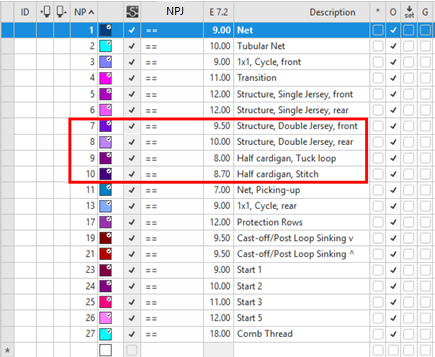
 - The İlmek uzunluğu (NP) tool window appears.
- 2
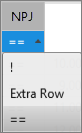
- Make the desired setting in the NPJ column:
|
|
! |
Protect the stitch tension area against a stitch length change |
|
Ekstra sıra |
Pattern row with different stitch lengths is divided, i.e. for each stitch length in one carriage stroke there will be entered a movement of the yarn carrier in the pattern. Result: Longer run time based on the moving of the yarn carrier (kick back). | |
|
== |
Carry out the stitch tension change evenly in both areas |
- 3
- Make the desired changes in the other columns for example E7.2, description, etc.
- 4
- Close the tool window.
II. Further Settings in Setup Data and Configuration:
-
Setup verileri:
Activation of MSECNPJ and preset of the speed to be used -
Yapılandırma:
Definition of the stitch length values for the Jacquard symbols . and N
Carry out presets in Setup data for Flexible Stitch (MSECNPJ):
- 1
- Open Başlat ribbon ->
 Setup verileri tool window ->
  Hız.
Hız. - 2
- Select the Davranış (MSECn) tab.
- 3
- In the Flexible Stitch'te (MSECNPJ) section carry out presets for working with PTS (NPJ):
 MSECNPJ: Pattern will be knit with PTS (NPJ) but the speed will not be adjusted.
 MSECNPJ: Pattern will be knit with PTS (NPJ) and the speed will be adjusted to the settings.
- 4
- Enter the desired carriage speed for working with PTS (NPJ) under .
- 5
- Close the tool window.
Make specifications for the Jacquard symbols while working with NPJ :
 : The allocation of stitch length values for both Jacquard symbols depends on the machine generation.
- 1
- Open Başlat ribbon -> Yapılandırma group ->
 Yapılandırma tool window.
 - 2
- Select the Diğer ayarlar tab.
- 3
- In the Değişken ilmek uzunluğu section under NPJ enter the desired value for the ‘.‘ = and N = Jacquard symbols.
- Symbol ‘.‘ =:
For this symbol there must be always a defined value. - Symbol N =:
A value must be defined when using the machine generation OKC.
- 4
- Close the tool window.