Quick Access Toolbar
In the quick access toolbar you have access at any time to the following commands:
 The quick access toolbar can be found at the left border of the title bar.

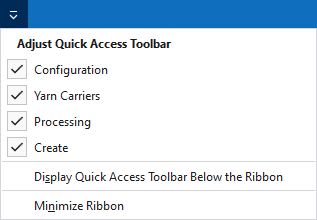
Using the drop-down menu you can display and hide some commands in the quick access toolbar.
Make settings for the presentation of the ribbon.
The following commands are always active in the quick access toolbar and cannot be hidden:
|
|
Yeni bir desen projesi oluşturun (*.spf). |
|
|
Bir dosya (desen, örme elemanı, kesim) açın. |
|
|
Kaydet |
|
|
Önceki işlem geri alınır. |
|
|
Önceki işlemi yineler. |
|
|
Örme elemanları, yani modüller, CA, MA ve desen parçaları, Knit Explorer'da düzenlenir. |


Hızlı erişim araç çubuğunu kişiselleştir
The following commands can be displayed and hidden in the quick access toolbar:
|
|
Yapılandırma iletişim kutusunu gösterir. |
|
|
Güncel siparişe ait tüm desenlerin mekik görünümünü açar (ardışık). Burada, mekik atamalarını ve renk parametrelerini görebilir ve düzenleyebilirsiniz. |
|
|
Etkin desenin teknik işlemi başlatılır. |
|
|
Etkin desenin örme programını (SIN; JAC; SET) teknik işleme göre oluşturur. |


Make settings for the quick access toolbar and the ribbon:
|
Hızlı erişim araç çubuğunu şerit çubuğunun altında göster |
Display the quick access toolbar under or above the ribbon. |
|
Menü şeridini simge durumuna küçült |
Show or hide the ribbon. |