Drawing Basic Pattern
Draw structure with different yarn colors:
- 1
- To draw, select the desired setting in the status bar
 .
. Desen rengi
- or - Modül rengi
 - 2
- Select drawing tool.
- 3
- Select any desired İplik renkleri, Depo renkleri or Mekik renkleri in the Desen renkleri tool window and draw it into the design pattern.
- 4
- Save as pattern element if necessary.
Example:
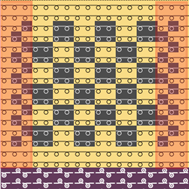
- 1
- Draw in a margin with a width of 3 needles e.g. for the border processing.