|
Makine
|
- As desired
- Example for CMS 530 HP W, E7.2 (classification 698)
|
|
|
-
Örme tekniği
-
Dolgu elemanları
- Any yarn color
-
Aktarmalı arka ilmek
-
Başlangıç
-
Başlama, 1x1
:
-
1 sistem
-
Elastomer iplik olmadan
-
Koruyucu iplik ile
-
Gevşek sıra
|
|
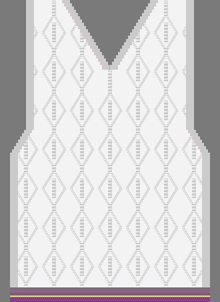
Desen projesi
|
Pattern-2.spf
|
|
Çizgi kesimi projesi
|
Shape_Front+Vneck.slsf
|
|
|
-
Çizim aracı:
-
 Çoklu kopya Çoklu kopya -
 Sihirbaz Değneği Sihirbaz Değneği -
 Çizgiyi doldur Çizgiyi doldur
-
Doldur :
-
 Kenar boş Kenar boş -
 Hassas Kenar Hassas Kenar -
 Kenarı ört Kenarı ört
-
Pop-up window with the drawing tools
- Call up with shortcut Ctrl + Space bar
-
 Knit Explorer Knit Explorer - Design
- Selection of knitting elements to draw
-
About the shape attributes
- Fading-out type / Fading-out width
- Narrowing type / Narrowing width
- Widening type / Widening width
-
Working in the dialog box Renk parametreleri
|
|

|
- Create a pattern project with one pattern.
- Draw design pattern (basic pattern) with existing knitting elements (pattern element) Aran.
- or -
With the knitting elements Yürütme, create a private Aran diamond. - Import and position shape on the basic pattern.
- Start Technical Processing.
- Generate knitting program.
(Sintral, Jacquard, Setup). - Run the Sintral Check.
- Set up the knitting program on the machine.
|