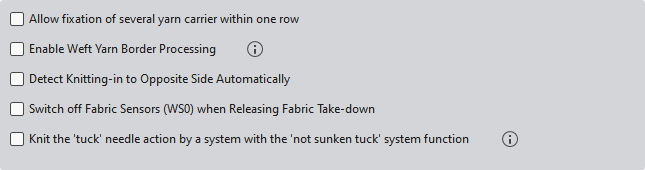
General settings

Birden fazla mekiğin aynı sıraya sabitlenmesine izin ver

Allows the fixation of several yarn carrier within one row.

Renk alanı kenarındaki atkı ipliğini sarmala

Renk alanı kenarındaki atkı ipliğini sarar veya kısaltır. Bunun için "Kenar işleme" sütununa dilediğiniz modülü girin.

  • The weft yarn cannot be withdrawn from the color field border when inserting the weft yarn next time in the opposite direction.
  • Without this option, a remaining distance without enclosure may result.

Only available for W machines.

Detect Knitting-in to Opposite Side Automatically

For each yarn carrier, the knitting-in to the opposite side will be determined automatically.
The Karşı yönden örgüye gir function in the Mekikler tool window will get disabled.

The yarn carriers which will be used closer to the opposite side of the home position will be knitted-in before the start to the opposite side.

Merdane çekimi gevşetilirken kumaş sensörünü kapat (WS0)

Switches off the fabric sensor when WB^(relieving belt take-down).

The WS0 command is entered in the knitting program.

Belt Take-down

"Askı" iğne hareketine sahip tüm teknik sıraları "İkinci ilmek sıkı ayarı ile birlikte" sistem fonksiyonu ile örülür

All technical rows with the Askı needle actions will be knit by a knitting system for which the ikinci ilmek sıkı ayarıyla birlikte option is set.

You activate the function for individual rows in the Sistem işlevi control column.
System Function

Knitting system conversion is required!
System Functions