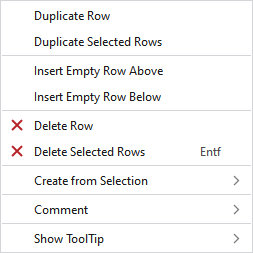
Context menu of the control columns
Make the following settings in the context menu of the control columns:
|
Sırayı çoğalt |
Duplicated the row at the cursor position. | |
|
Seçili sıraları çoğalt |
Duplicates the selected rows. | |
|
Üste boş sıra ekle |
Enters an empty row above the clicked row. | |
|
Alta boş sıra ekle |
Enters an empty row under the clicked row. | |
|
|
Deletes the row at the cursor position. | |
|
|
Deletes all the selected rows. | |
|
Seçimden oluştur |
MC jakarı... Generates a new MC Jacquard of the selected area. | |
|
Yorum | ||
|
HızlıBilgi göster |
|
Activates the tooltip in the needle area. |
|
|
Activates the tooltip in the control columns. | |
|
|
The coordinates of the drawing are shown when drawing. | |


