Pattern Item
In the Desen tool window appears for every pattern a pattern entry.
|
|
A thumbnail of the pattern appears on the left beside the pattern name. Double-clicking on the pattern name opens the pattern. |
|
|
The icon appears it a shape is positioned on the pattern. Double-clicking on the icon opens the shape. |
|
|
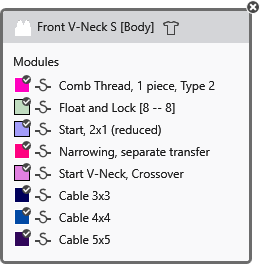
Clicking on the 3 dots opens a window where all modules that are used in the pattern are displayed.
The feature of the To close the window again, click on the cross at the top right corner. |