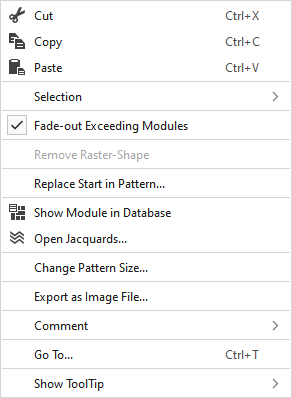
Context menu of the pattern layer
Make the following settings in the context menu of the pattern layer:
|
|
Seçimin içeriğini siler ve panoya kopyalar. | |
|
|
Seçimin içeriğini panoya kopyalar. | |
|
|
Kopyalanan veya kesilen öğeleri seçilen konuma yapıştırır. | |
|
Seçim |
Jakar oluştur... |
I. Generate a Jacquard area in the selected area. |
|
|
Create a pattern element from the selection. Mevcut seçimden yeni bir desen parçası oluşturur ve bunu 'Desen parçaları' araç penceresine ekler. | |
|
Select |
The functions of the menu bar Seçimden oluştur are also available in the context menu. | |
|
Koru |
A selection can be protected from interventions. | |
|
|
Bir kesim çizgisinin veya işaretin soluklaştırma eninden kesilen temel desen modüllerini gizleyin. | |
|
Kılavuz şeklini kaldır |
If a .spf pattern with raster-shape is imported, this function can be used to remove the raster-shape from the pattern.
| |
|
Desendeki başlangıcı değiştir... |
Dilediğiniz başlangıcı seçmek için Başlangıcı değiştir iletişim kutusunu görüntüleyin. | |
|
|
Shows the module at the cursor position in the database. | |
|
|
Opens the tool window Jakarlar and shows in it the Jacquard of the cursor position. | |
|
Desen boyutu değiştir... |
Opens the dialog box where you can change the height and width of the pattern. | |
|
Resim dosyası olarak dışa aktar... |
Save the design view off the whole pattern as image file. | |
|
Yorum |
Place a pin, comment, or graphic anywhere in the pattern. | |
|
Git... |
Opens the Git dialog box. | |
|
HızlıBilgi göster |
Make settings for the tooltip. | |


 You cannot edit a raster-shape in
