Context Menu of Pattern Elements
|
|
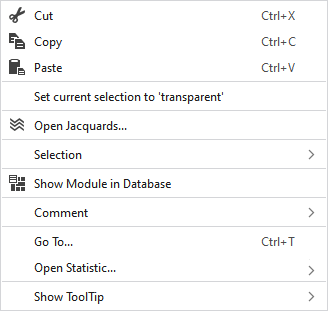
Seçimin içeriğini siler ve panoya kopyalar. | |
|
|
Seçimin içeriğini panoya kopyalar. | |
|
|
Kopyalanan veya kesilen öğeleri seçilen konuma yapıştırır. | |
|
Güncel seçimi 'transparan' olarak ayarla |
Sets the selected area in the pattern element to transparent. | |
|
|
Opens the Jacquard at the cursor position in the Jacquard table. | |
|
Seçim |
Jakar oluştur... |
Generate a Jacquard area in the selected area.
|
|
Select |
The functions of the menu bar Seçim are also available in the context menu. | |
|
Koru |
A selection can be protected from interventions. | |
|
|
Shows the module at the cursor position in the Module Explorer. | |
|
Yorum |
Place a pin, comment, or graphic anywhere in the pattern. | |
|
Git... |
Opens the Git dialog box.
| |
|
|
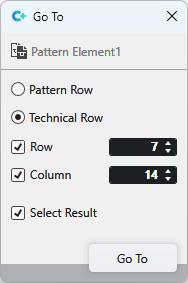
Entry in Sıra | |
|
|
Entry in Sıra | |
|
|
Enter the Sıra you want to jump to. | |
|
|
Enter the Sütun you want to jump to.
| |
|
|
The jumped to result is selected. | |
|
HızlıBilgi göster |
|
Activates the tooltip in the needle area. |
|
|
Activates the tooltip in the needle area, as well as a preview of the modules. | |
|
|
Activates the tooltip in the control columns. | |
|
|
Activates the tooltip in the control columns as well as a preview of CA and MA. | |
|
|
The coordinates of the drawing are shown when drawing. | |



 refers to a
 With row and column enabled, the position with the corresponding coordinates is jumped to.
