Basic Settings
Temel ayarlamalar
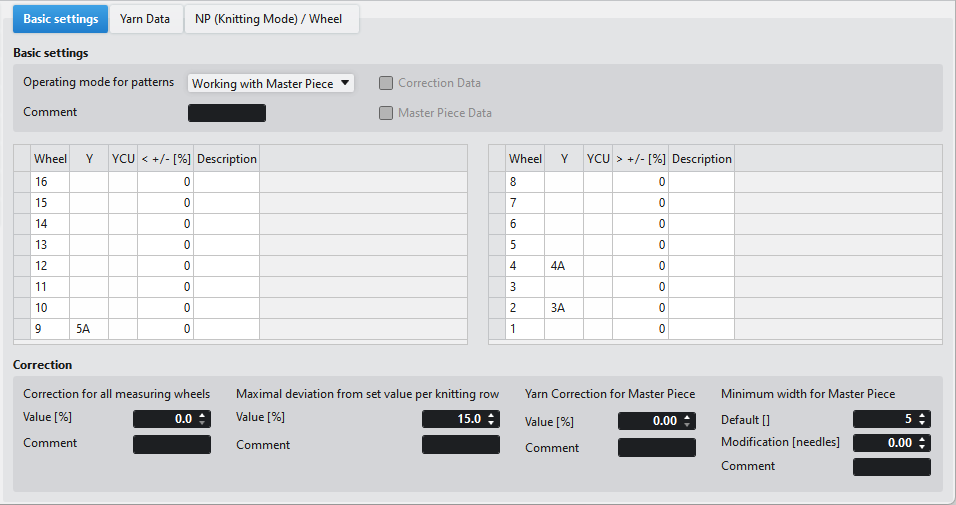
|
Desenlerin çalışma modu |
Select operating mode of the İplik uzunluğu kontrolü. The following 3 options are available. | |
|
YLC'siz üretim |
Working without İplik uzunluğu kontrolü. | |
|
mm ile çalışma |
Determination of correction data. Production according to the [mm] table (replaces YLC1, 7YLC and YLC8) | |
|
Masterpiece ile çalışma |
Determination of Master Piece data. Production (replaces YLC5 and YLC 6) | |
|
Yorum |
Enter a comment. | |
|
Düzeltme verileri |
| |
|
Orijinal veriler |
| |

 The checkbox is active, if correction data was imported from the machine using the Setup import.
 Sol ölçüm çarkları
|
Çark |
Ölçüm çarklarının karakteristik numarası |
|
Y |
Ölçüm çarkı ile çalışan mekiği |
|
YCU |
Select the yarn control unit working with the measuring wheel. |
|
< +/- [%] |
Sol tarafta iplik uzunluk ölçümü için düzeltme değeri < +/- [%] |
|
Açıklama |
Girdinin kullanımı ile ilgili bilgi. Buraya bir metin girebilirsiniz. |
Sağ ölçü çarkları
|
Çark |
Ölçüm çarklarının karakteristik numarası |
|
Y |
Ölçüm çarkı ile çalışan mekiği |
|
YCU |
Select the yarn control unit working with the measuring wheel. |
|
> +/- [%] |
Sağ tarafta iplik uzunluk ölçümü için düzeltme değeri > +/- [%] |
|
Açıklama |
Girdinin kullanımı ile ilgili bilgi. Buraya bir metin girebilirsiniz. |
Düzeltme
|
Tüm ölçüm çarkları için düzeltimler |
Make correction for all measuring wheels. |
|
Değer [%] |
Enter the correction value. |
|
Yorum |
Enter a text. |
|
Örgü sıra başına olması gerekenden azami sapma |
Specify the maximum deviation of the target value per knitting row allowed. |
|
Değer [%] |
Enter value for the allowed deviation. |
|
Yorum |
Enter a text. |
|
Masterpiece için iplik düzeltimi |
Make correction for the original piece (Master Piece). |
|
Değer [%] |
Enter the correction value. |
|
Yorum |
Enter a text. |
|
Masterpiece için minimum genişlik |
There is a minimum width for working with Master Piece. |
|
Varsayılan [] |
Shows the default minimum width. |
|
Değişim [iğneler] |
Enter the change for the minimum width. |
|
Yorum |
Enter a text. |


