Counter output
This dialog box displays the Sintral counters and cycle counters in use with their actual counts for each knitting system. The dialog box is displayed and hidden with the  icon on the toolbar.
With the left mouse button, you can enlarge or reduce this dialog box.
The data for each working knitting system is written on a separate line. When you select a line with the left mouse button, it is displayed as selected in all other data dialog boxes.
The following columns, beginning from the left, are always displayed:
|
Column |
Meaning |
|---|---|
|
Row |
Line number |
|
With one-piece knitting: | |
|
#L |
Counter for the left edge when Fully fashion knitting |
|
#R |
Counter for the right edge when Fully fashion knitting |
|
#LM |
Counter for the left edge in the center when knitting fully fashion |
|
#RM |
Counter for the right edge in the center when knitting fully fashion |
|
With two piece knitting: | |
|
#L1 |
Counter for the left edge when Fully fashion knitting |
|
#R1 |
Counter for the right edge when Fully fashion knitting |
|
#LM1 |
Counter for the left edge in the center when knitting fully fashion |
|
#RM1 |
Counter for the right edge in the center when knitting fully fashion |
|
#L2 |
Counter for the left edge when Fully fashion knitting |
|
#R2 |
Counter for the right edge when Fully fashion knitting |
|
#LM2 |
Counter for the left edge in the center when knitting fully fashion |
|
#RM2 |
Counter for the right edge in the center when knitting fully fashion |
|
| |
|
#135 |
Carriage speed MSEC in cm/s |
|
#141 |
1st fabric piece (SEN1) left fabric selvedge |
|
#142 |
1st fabric piece (SEN1) right fabric selvedge |
 : This specification corresponds to the technical row number in the pattern.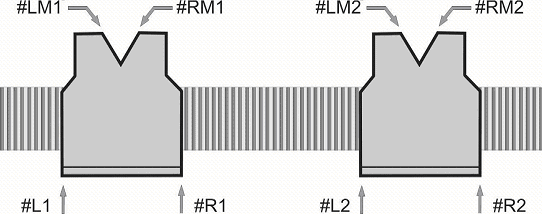
All other counters and cycle counters used in the knitting program are also displayed. They can be hidden or displayed with the functions in the Counter menu.