Shape Properties
You make the following settings in the Kesim özellikleri dialog box:
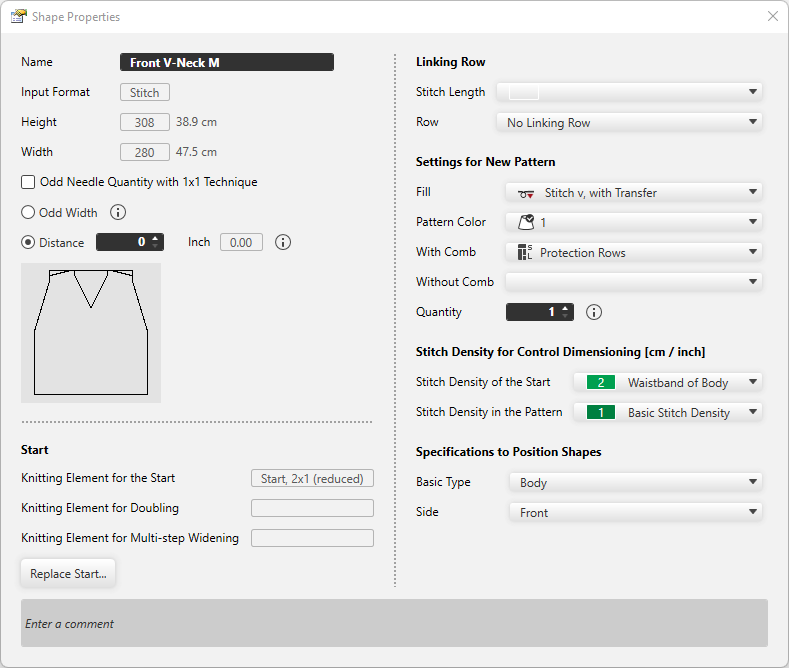
|
Ad |
Displays the name of the shape. |
|
Giriş formatı |
Shows the input format. (Stitch, steps or hand knitting (courses) ) |
|
Yükseklik: |
The height of the shape appears |
|
Genişlik: |
The width of the shape appears. |
|
|
With 1x1 technique the width is set to an odd needle quantity. |
|
|
Widens the distance of shape halves by one needle to get an odd width of the fabric piece. |
|
|
Enter the distance in needles between the shape halves. |


Başlangıç
|
Başlangıç için örme elemanı |
The knitting element for the start appears. |
|
Katlama için örme elemanı |
The knitting element for Doubling appears. |
|
Çok adımlı artırma için örme elemanı |
The knitting element for multi-step widening appears. |
|
Başlangıcı değiştir |
Make the settings for the Start, Doubling and multi-step widening. |
Remayöz sırası
|
İlmek uzunluğu |
Select the stitch length for the linking row. |
|
Sıra |
Select row where the selected stitch length should have an effect. |

Yeni desen için ön veriler
|
Dolgu |
Select fill for the new pattern. (needle action or knitting element) |
|
Desen rengi |
Select pattern color for the new pattern. |
|
Taraklı |
Select the knitting technique for the protection rows with comb. |
|
Taraksız |
Select the knitting technique for the protection rows without comb. |
|
Adet |
Enter the quantity of patterns that should be knitted in the sequence. |

Kontrol boyutları için ilmek yoğunluğu (cm / inç)
|
Başlangıçtaki ilmek yoğunluğu |
Select the stitch density for the start. The entries of the İlmek yoğunluğu tool window are available. |
|
Desendeki ilmek yoğunluğu |
Select the stitch density for the pattern. The entries of the İlmek yoğunluğu tool window are available. |
Kesim yerleştirme bilgileri
|
Temel tip |
Select the basic type of the shape. |
|
Sayfa |
Select the page to which the shape relates. |
|
Yorum girin |
Enter a comment for the shape. |