Pattern Properties
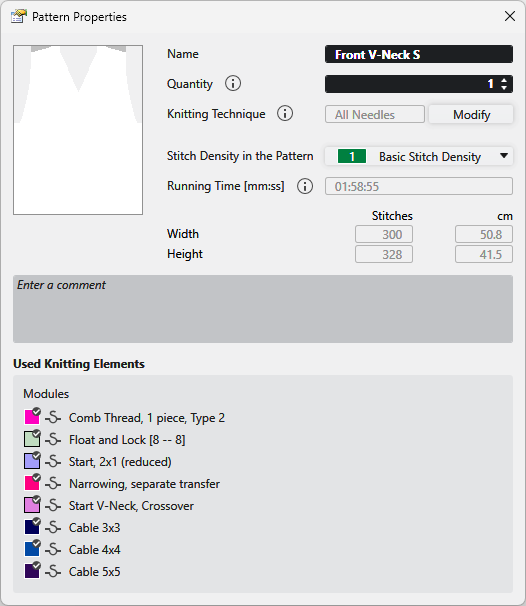
In the Desen özellikleri dialog box you get the information on the pattern and can make the following settings.
|
Ad |
View and edit the name of the pattern. |
|
Adet |
Enter the quantity of fabric pieces to be knitted of this pattern. |
|
Örme tekniği |
Displays the knitting technique (all needles or 1x1 technique).
|
|
Değiştir |
Changes the knitting technique between Tüm iğneler and 1x1 teknik . |
|
Desendeki ilmek yoğunluğu |
Displays the entered stitch density of the pattern. Select an entry from the İlmek yoğunluğu tool window. |
|
Çalışma süresi [mm:ss] |
Shows the running time in minutes and seconds.
|
|
Genişlik |
Shows the width of the pattern in İlmekler and cm. |
|
Yükseklik |
Shows the height of the pattern in İlmekler and cm. |
|
Yorum girin |
Enter a comment to the pattern. |
|
Kullanılan örme elemanları |
Shows the modules in use by the pattern. |


 You have to enable the "odd needle quantity" check box of the shape properties for a pattern with overlying shape in 1x1 technique with an odd quantity of needles.