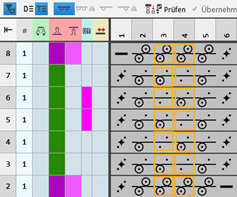
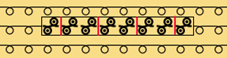
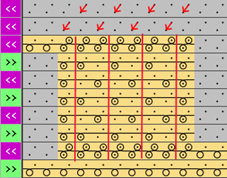
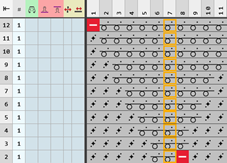
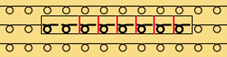
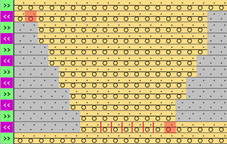
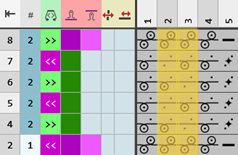
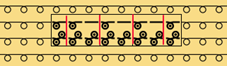
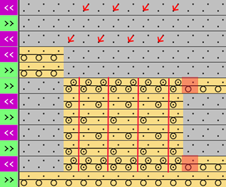
Example: Structure module with connecting points with repetition
Properties:
- A knitting-in and knitting-out row in the knitting element is defined by a connection point.
- A connecting point integrates the design row of the knitting element in to the design pattern.
- A knitting element may have one or more connecting points.
- Quantity of technical rows
- Even-numbered: Knitting-in and knitting-out on the same side
- Odd-numbered: Knitting-in and knitting-out on the opposite side
- Technical Rows
- Without entry of carriage direction
 : The structure module with connecting point can be mirrored.
 - With entry of carriage direction: The structure module with connecting point depends on the direction and cannot be mirrored therefore.
Create structure module with connecting points and repetition:
- 1
- Open the 新编织元素 dialog box with
 新编织元素.
- or -
In the 编织元素 tool window / select the 创建新模块... context menu.
 - 2
- Make the following settings:
- 编织工艺
- 满针
- 编织元素类型 :
- 结构模块
- 填充元素
- No yarn color / magazine color or yarn carrier color
- No Needle Action
- 尺寸 [线圈]
- 宽度 : fix width
- 高度 : even-numbered or odd-numbered
- 1
- Close the dialog box with 确定.
- The Knitting Element Editor is opened.
- 2
- Select the 织针动作 / 颜色 tab.
- 3
- In the drawing canvas, in the technical rows, draw the desired structure with the knitting needle action.
- The design rows are generated automatically and not displayed.
- 4
- If necessary, select a color for drawing.
-
Without color:
No allocation of a yarn carrier, i.e. color of the design pattern is used -
With color:
allocation of a yarn carrier, i.e. the used color is applied to the design pattern.: If desired, adapt this design row to the color of the structure module.
- 1
- Insert an empty column on the left and right side of the structure, if desired.
- The columns don't have any needle action.
- 2
- Overwrite these columns with
 透明.
透明. - 3
- Select the 控制 tab.
- 4
- Select the
 icon and draw it into the technical rows of knitting in and out.
执行行里与织针相关的符号 section -> 连接属性: Not into the design rows! - 5
- If desired, allocate any desired color to the icon of the 定义颜色 section.: No effect on the development, only for a better overview.
- 6
- Select the
 随后重复symbol.
执行行里与织针相关的符号 section → 重复 - 7
- Define the repeating cycle related to columns by the selected icon.
- 8
- Enter the desired control column data in the technical rows:
- Stitch Length
- Fabric Take-down
- Cycle
- Carriage Direction
-
No entry of a carriage direction:
The knitting element is independent of the carriage stroke and can be entered on any desired pattern row of the 设计花型. -
Entry of a carriage direction:
The knitting element depends on the carriage stroke and can must be entered on the corresponding pattern row of the 设计花型.: All technical rows must have a preset carriage direction. - etc.
- 1
- If desired, apply the control column data from the technical rows to the design rows with the
 控制列 button activated.
 - 2
- Select technical rows for grouping.
- 3
- Group the selected rows with the CTRL + G keys.
- 4
- Check the knitting element with
 检验 regarding correct entries in the knitting element.
 - 5
- If necessary, in case of a knitting element already used in the design pattern, apply the changes to the basic pattern with the
 应用 button.
 - 6
- Close the 新编织元素 tool window with
 .
. - The knitting element is saved.
- 7
- Select a knitting element.
- 8
- Position the cursor in the 设计花型.
- Make both of the following steps in order to insert the knitting element with repetition into the pattern.
用重复元素绘图 - 开始尺寸设定 - 步骤1/2 :
通过在织针区域单击鼠标或使用<CTRL> + <Alt>键并移动鼠标来开始调整循环尺寸。或者借助<CTRL> + <Alt>键和移动鼠标的方式。
用重复元素绘图 - 结束尺寸设定 - 步骤2/2:
再次点击鼠标结束循环尺寸设置。
Examples for knitting element with a connecting point and repetitions
|
Odd-numbered quantity of technical rows in height | |||
|
Example 1 |
| ||
|
|
| ||
|
Example 2 |
| ||
|
|
| ||
|
| |||
|
Even-numbered quantity of technical rows in height | |||
|
Example 1 |
| ||
|
|
| ||