Tools in the Color Arrangement Editor
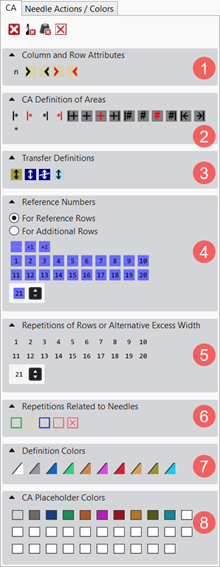
CA tab: Meaning of the Symbols
|
1 |
列和行属性 | |||
|
|
相关列 |
Marking of the column for the reference numbers | ||
|
|
纵向重复列 |
For creating repetitions in the height (cycles) | ||
|
|
左侧模型区域列 |
Fabric selvedge in the right of the fabric piece center
| ||
|
|
右侧模型区域列 |
Fabric selvedge in the fabric piece center left
| ||
|
|
左织片列 |
Left outer edge of a fabric piece.
| ||
|
|
右织片列 |
Right outer edge of a fabric piece.
| ||
|
2 |
颜色排列 区域定义 | |||
|
|
从左侧花型列开始重复 |
Repeat the selected column area within the color relative to the first pattern column. | ||
|
|
向右重复 |
Repeat the selected column area starting from the left color field edge. | ||
|
|
从右侧花型列开始重复 |
Repeat the selected column area within the color relative to the last pattern column. | ||
|
|
向左重复 |
Repeat the selected column area starting from the right color field edge. | ||
|
|
超出宽度,覆盖,从左花型边缘开始重复 |
Enter a overwriting additional column on the left relative to the first pattern column of a color area. | ||
|
|
超出宽度,改写 |
Enter an overwriting additional column on the left and / or right of a color area. | ||
|
|
超出宽度 |
Do not enter an overwriting additional column on the left and / or right of a color area. | ||
|
|
超出宽度,覆盖,从右花型边缘开始重复 |
Enter a overwriting additional column on the right relative to the last pattern column of a color area. | ||
|
|
|
Effect: Example: Intarsia Binding | ||
|
|
模型边缘超出宽度,覆盖,从左花型边缘开始重复 |
Enter a overwriting additional column on the left relative to the first pattern column of a color area at the shape edge. | ||
|
|
模型边缘的超出宽度,覆盖 |
Enter an overwriting additional column on the left and / or right of a color area at the shape edge. | ||
|
|
模型边缘的超出宽度 |
Do not enter an overwriting additional column on the left and / or right of a color area at the shape edge. | ||
|
|
模型边缘超出宽度,覆盖,从右花型边缘开始重复 |
Enter a overwriting additional column on the right relative to the last pattern column of a color area at the shape edge. | ||
|
|
|
Effect:
| ||
|
|
左侧织物边缘 |
Fading-out at the left fabric selvedge by the drawn-in width . | ||
|
|
右侧织物边缘 |
Fading-out at the right fabric selvedge by the drawn-in width. | ||
|
|
重复行 |
For defining cycles in the
| ||
|
|
在搜索行里模型之外 |
For defining specifications in the needle bed in the area at the left of the #L counter and in the area at the right of the #R counter, also for specifying outside shape.
| ||
|
3 |
翻针定义 | |||
|
|
转换模型的设置 |
Specify the pattern rows for transferring the narrowings and widenings | ||
|
|
结构翻针设置 |
Specify the pattern rows for transferring the structures. | ||
|
|
Do not allow structure transferring |
Specify the pattern row in which the transferring of the structure is not allowed | ||
|
|
自动翻针的设置 |
Specify the pattern rows for auto transferring | ||
|
4 |
基准号码 | |||
|
| ||||
|
|
保留基准行号 |
The previous reference row number is retained, i. e. that the reference row number will not be incremented. | ||
|
|
增大基准行号 1 |
Edited reference row number will be increased by 1 for further editing.
| ||
|
|
增大基准行号 2 |
Edited reference row number will be increased by 2 for further editing, i.e. one pattern row is skipped. | ||
|
|
Reference Row Number from 1 to 20 |
Selection of the reference row numbers for numbering the reference rows in the design pattern | ||
|
|
|
Selection of further reference row numbers greater than 20 | ||
|
| ||||
|
|
Retain the number of additional row |
The previous reference row number is retained, i. e. that the reference row number will not be incremented. | ||
|
|
Increase the number of additional row by 1 |
Edited reference row number will be increased by 1 for further editing. | ||
|
|
Increase the number of additional row by 2 |
Edited reference row number will be increased by 2 for further editing, i.e. one pattern row is skipped. | ||
|
|
Number of additional row from 1 to 20 |
Selection of the additional row number for numbering the additional rows in the Color Arrangement | ||
|
|
|
Selection of further reference additional row numbers greater than 20 | ||
|
5 |
行重复或替代超出宽度 | |||
|
|
Repeating of rows or excess width 1 to 20 |
Numbers for defining
| ||
|
|
Repeating of rows or excess width 21 and higher | |||
|
6 |
与织针相关的重复 | |||
|
|
区域开始 |
Select areas and define them according to the type of knitting element.
| ||
|
|
第一个重复 | |||
|
|
随后重复 | |||
|
|
删除区域 |
Delete the marked areas | ||
|
7 |
定义颜色 | |||
|
|
For visual marking of
| |||


 : Corresponds to


 to
to 

 to
to 


 to
to 