Raster-Shape Symbols
模型符号
起头 tab -> 工具窗口 -> 模型符号
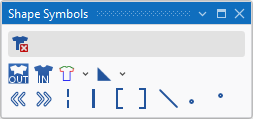
In the 模型符号 tool window select the shape symbols to draw.
|
|
删除模型数据 Can be selected in addition (with the CTRL key pressed) to a shape symbol. Only the selected shape symbol is deleted when drawing. All the other shape symbols are retained. |
|
|
模型外 |
|
|
模型内 |
|
|
模型边缘(F2)
|
|
|
模型标记
|
|
|
向左排列 |
|
|
向右排列 |
|
|
楔形 |
|
|
开领点 |
|
|
填充开领 |
|
|
填充开领 |
|
|
边缘组织 |
|
|
模型边缘前板线圈长度 |
|
|
模型边缘后板线圈长度 |


 A selected shape symbol overwrites the existing shape symbols when inserting it into the pattern. You can enter it additionally with the CTRL key pressed. You can remove it by the CTRL-ALT key.