Marking Point Properties
起头 tab -> 属性 group ->  标记点属性
标记点属性
 If you have opened a shape in the pattern project, you can find the 标记点属性 tool window under the 模型编辑 tab -> 属性 group.
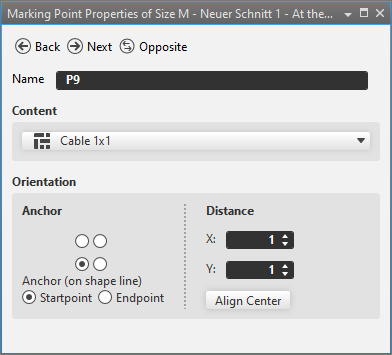
In the 标记点属性 tool window you make the following settings for the marking points.
|
|
从所选对象转到同类的上一个对象。 |
|
|
从所选对象转到同类的下一个对象。 |
|
|
从所选对象转到相应的对称对象。仅对对称对象有效。 |
|
名称 |
Name of the selected marking point. |
|
内容 |
Select a 编织元素 that is inserted as a marking.
|
|
打印方向 |
Specify the 打印方向 of the marking. |
|
定位点 |
Using the
|
|
Anchor (on shape line) |
Specify the anchor on the shape line. Only available for markings on shape lines. |
|
|
定位点 is located on the startpoint of the shape line. |
|
|
定位点 is located on the endpoint of the shape line. |
|
距离 |
Enter distance to 定位点. |
|
X |
Enter X-coordinate of 位置. |
|
Y |
Enter Y coordinate of 位置. |
|
水平居中 |
Inserts the knitting element centered. |


 options, specify the orientation of the knitting element.