Doubling
 罗纹并针
罗纹并针
The start is knitted with a specified excess width and then it is narrowed to the pattern width through multi-step narrowing.
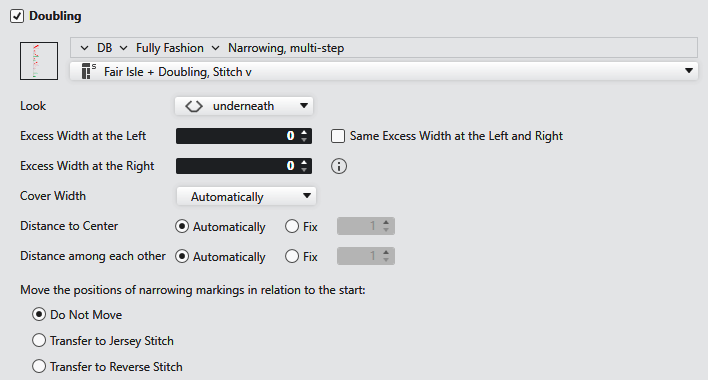
|
|
Opens the 编织资源管理器. Select the module for multi-step narrowing. |
|
|
Select the path from the 编织资源管理器 directly. Click on the arrow |
|
|
Select module for multi-step narrowing. |
|
外观 |
Select the look. |
|
左侧超出宽度 |
Enter excess width for the left side. |
|
右侧超出宽度 |
Enter excess width for the right side. |
|
|
Same excess width for both sides. When the selection is activated, then 右侧超出宽度 will be greyed out. |
|
| |
|
覆盖宽度 |
Select cover width. |
|
到中心的距离 |
The distance of the first narrowing marking to the center of the fabric is defined proportionally. |
|
到中心的距离 |
Enter the distance of the first narrowing marking to the center of the fabric. |
|
彼此之间距离 |
The distance among the narrowing markings is defined proportionally. |
|
彼此之间距离 |
Enter the distance among the narrowing markings. |
|
相对于起点移动收针标记的位置 |
Enter the settings for the position of the narrowing markings. |
|
|
The positions of narrowing markings are determined automatically. |
|
|
Moves the narrowing markings in such a way that the stitch of the narrowing marking is always transferred to a jersey stitch during the narrowing. The markings of the left side are moved to the right if necessary. |
|
|
Moves the narrowing markings in such a way that the stitch of the narrowing marking is always transferred to a reverse stitch during the narrowing. The markings of the left side are moved to the right if necessary. |





