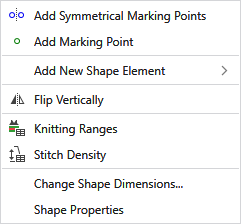
Context Menu of the Lined Shape
|
|
添加一个标记点和其对称标记点。 |
|
|
添加一个标记点。 |
|
添加新模型元素 |
Adds a new shape element.
|


|
|
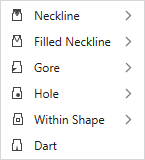
Inserts a neckline. or 不对称 |
|
|
Inserts a filled neckline. 对称 or 不对称 |
|
|
Inserts a gore area. 对称 or 不对称 |
|
|
Adds a hole. 对称 or 不对称 |
|
|
Inserts a dart. 对称 or 不对称 |
|
|
Inserts an area in the shape that can be filled with pattern color and with knitting element. 对称 or 不对称 |


|
|
纵向镜像翻转单个模型 |
|
|
显示定义的编织区域表。 |
|
|
显示线圈密度表。 |
|
更改模型尺寸... |
打开对话框更改模型尺寸。模型包含不同密度区域时无法实现。 |
|
模型属性 |
Opens the 模型属性 dialog box. |


