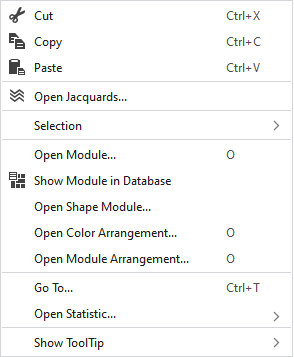
Context Menu of the Symbol View
|
|
删除选择区域的内容并将其复制到剪贴板上。 | |
|
|
将选择区域的内容复制到剪贴板上。 | |
|
|
将剪贴板上的内容带到光标上(光标属性)。 | |
|
|
Opens the Jacquard setting of the cursor position in the tool window 提花. | |
|
选择 |
创建结构模块... |
Create a structure module from the selection |
|
Select |
The functions of the menu bar 选择 are also available in the context menu. | |
|
Correction of Stitch Length Groups (NPGK) |
Manage the correction of stitch length groups (NPGK) of the selected area. | |
|
打开模块... |
Opens the module at the cursor position.
| |
|
|
Shows the module at the cursor position in the database. | |
|
打开模型模块... |
Opens the shape module at the cursor position. | |
|
打开颜色排列 |
Opens the Color Arrangement at the cursor position.
| |
|
打开模块排列... |
Opens the Module Arrangement at the cursor position.
| |
|
转到... |
Enter | |
|
Open Statistics |
Open the Statistics dialog box. | |
|
显示工具提示 |
|
Activates the tooltip in the needle area. |
|
|
Activates the tooltip in the needle area, as well as a preview of the modules. | |
|
|
Activates the tooltip in the control columns. | |
|
|
Activates the tooltip in the control columns as well as a preview of CA and MA. | |


 Position the cursor on a module in the pattern and press the


