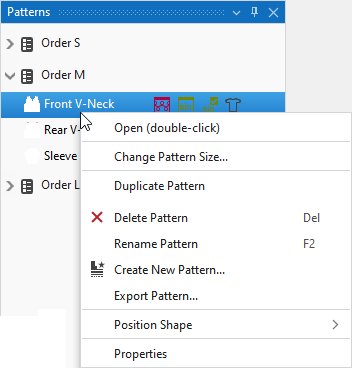
Context menu on the pattern name
Run the following functions in the context menu of the pattern name:
|
Show Symbol View (double-click) |
Opens the pattern. |
|
更改花型尺寸... |
Opens the 更改花型尺寸 dialog box where you can change the height and width of the pattern. |
|
复制花型... |
Opens the 复制花型及模型 dialog box. |
|
|
Deletes the pattern. |
|
重命名花型 |
Rename the pattern. |
|
|
Create a new pattern. |
|
Export Pattern... |
A new pattern project will be created. The pattern you clicked will be saved within this new pattern project. |
|
定位模型 |
Position the shape on pattern. |
|
属性 |
Opens the 花型属性 window |


