Pattern Elements (Replace / Exchange)
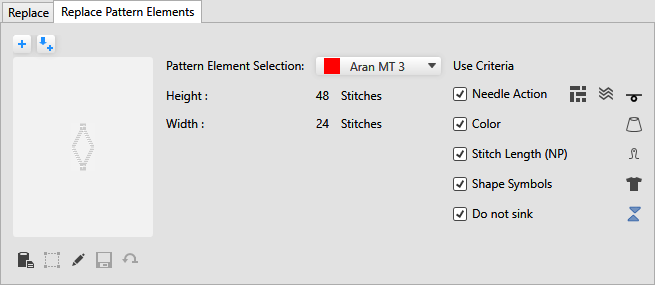
 The description of the settings for 互换, corresponds to the same for 替换, unless it is expressly indicated.
|
|
Adds the current cursor attribute to the already defined criteria for insert. This action affects all criteria for insert, not only pattern elements.
|
|
|
Adds the current criteria for insert for pattern elements to the already defined criteria for insert. |
|
花型元素选择: |
Select the pattern element. All pattern elements from the 花型元素 tool window are available for selection in the drop-down list box. |
|
高度 |
Displays the height in stitches of the selected pattern element. |
|
宽度 |
Displays the width in stitches of the selected pattern element. |
|
使用条件 |
Select the criteria for insert of the pattern element that should be applied. |
|
|
Insert knitting elements, Jacquards or needle actions of the selected pattern element. |
|
|
Insert the color of the selected pattern element. |
|
|
Insert the stitch length of the selected pattern element. |
|
|
Insert the shape symbols of the selected pattern element. |
|
|
Insert the symbols for not sinking of the selected pattern element. |
|
|
Paste the pattern element from the clipboard into the criteria for insert. |
|
|
Create a temporary pattern element from the selection and insert in the criteria for insert. If you have created a temporary pattern element from a selection and applied the criteria for insert, then in the 花型元素选择: appears 临时花型元素 |
|
|
Open and edit the selected pattern element.
If you have edited a temporary pattern element, then in the 花型元素选择: appears 编辑临时花型元素 |
|
|
Save the edited pattern element as new pattern element in the 花型元素 tool window. |
|
|
Delete the temporary pattern element. |

 Select the attribute in the pattern that is to be found and then click on this button, to rapidly define the criteria for insert.


 The opened pattern element is only opened temporarily from the criteria for insert and saved there again with the changes.
