Context menu on an empty area
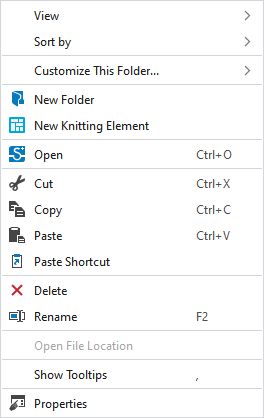
You make the following settings in the context menu on an empty area beside the knitting elements:
|
视图 |
Select the view of the knitting elements.
|
|
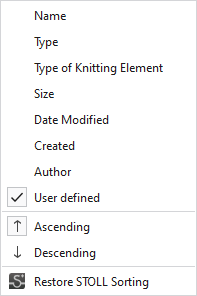
排序 |
Select the property after which the knitting elements are sorted.
|
|
自定义该文件夹... |
应用视图到所有文件夹
应用当前排序到所有文件夹 |
|
|
Create a new folder. |
|
|
创建一个新的编织元素(*.smf)。 |
|
|
Open the selected knitting element. |
|
|
Cut-out the selected knitting element.
|
|
|
Copy the selected knitting element to the clipboard. |
|
|
Paste the knitting element from the clipboard. |
|
|
Paste a shortcut of the copied knitting element. |
|
|
Remove the selected knitting element.
|
|
|
Rename the selected knitting element.
|
|
打开文件路径 |
Open the folder via the 编织元素记录 path. |
|
显示工具提示 |
Display ToolTip on the knitting elements. |
|
属性 |
Show 属性 dialog box. |




 Only possible for privately generated knitting elements.


