Image File Settings
In the 图像文件设置 dialog box you make the following settings for the export of the fabric view:
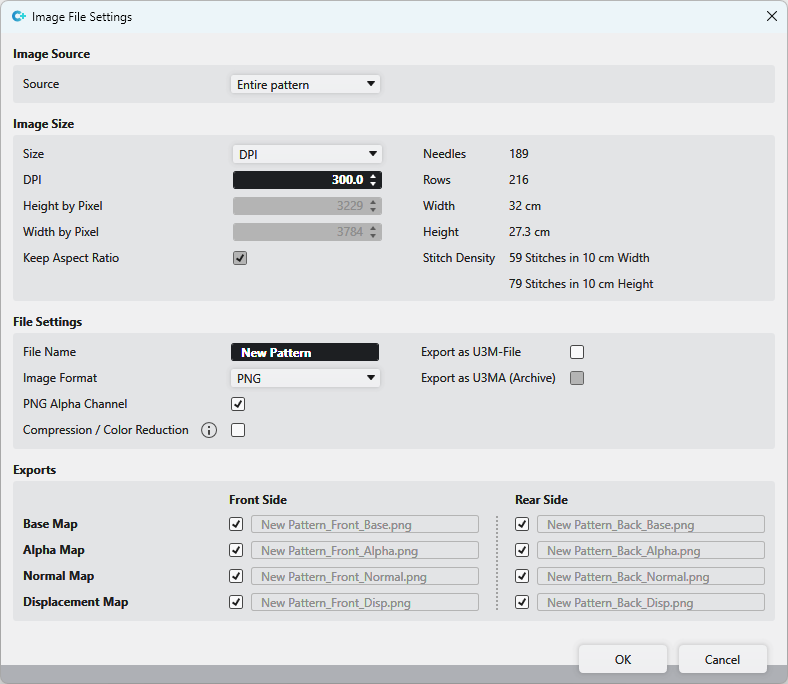
图片来源
|
来源 |
Select image source
|

图片尺寸
|
尺码 |
Select size specification format DPI or 像素 |
|
DPI |
Enter DPI value |
|
高度像素 |
Enter height in pixels |
|
宽度像素 |
Enter width in pixels |
|
保持纵横比 |
The size ratio of the pattern is maintained |
|
织针 |
Width of the image file in needles |
|
行 |
Height of the image file in rows |
|
宽度 |
Width of the image file in cm The specification corresponds to the set stitch density |
|
高度 |
Height of the image file in cm The specification corresponds to the set stitch density |
|
线圈密度 |
Specification, in the 花型属性 selected stitch density |


文件设置
|
文件名 |
Display of the pattern name |
|
照片格式 |
Select image format
PNG |
|
When selecting PNG: | |
|
PNG Alpha 通道 |
PNG with or without transparency |
|
压缩 |
图片将减色至 256 个颜色。图片质量将有可能下降。当然文件大小将显著缩小。 |
|
When selecting JPEG: | |
|
JPEG 质量 |
JPEG with specification of the quality |
|
Independently from the selection of the image format: | |
|
导出为 U3M 文件 |
Export as U3M file U3M is a standardized format for 3D visualization. |
|
导出为 U3M (存档文件) |
Exports the files compressed in a U3MA zip file. |
 Export the fabric view for further processing to a 3D apparel software always as PNG with enabled transparency (
导出
 So-called Maps are used for the 3D visualization and 3D simulation to assign two-dimensional images to the three-dimensional surfaces of the models.
The different types of Maps give a more detailed and realistic appearance to the computer generated 3D models.
|
Base Map |
Export Base Map Base Map is the basic texture with the visible colors. |
|
初始视图 |
Export Alpha Map An alpha Map contains information about transparent areas of a texture. |
|
普通视图 |
Export Normal Map The Normal Map, also called Bump Map, specifies the angle, with which virtual light is reflected over a digital surface. With it the appearance of the texture depth is simulated. The Normal Map is a necessary part of digital textures in a 3D software. |
|
移位视图 |
Export Displacement Map A Displacement Map, also called Height Map, can artificially generate an additional height of a digital texture. This way, a more realistic appearance of three-dimensional surface structure results within a 3D model. |
|
前侧 |
Export the corresponding selection as the front side |
|
后侧 |
Export the corresponding selection as the rear side |