How to Sort the Sizes
You can change the sorting of sizes according to your needs.
- A set of different sizes is created.
- 1
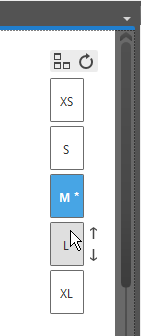
- Put the mouse pointer to the desired size in the dimensioning view.
- 2
- Click the arrow next to it in order to sort the desired size to top or button.
- 3
- Repeat clicking the arrow until the desired sorting is achieved.
- The sizes are re-sorted within the Measure Table.
