Group assignment
- If you want to assign a storage feed wheel to a yarn carrier, you first have to create the groups in the 导纱器 tool window, 送纱器组合 tab.
Group Feed Wheels Tab - For every one of these groups select a feed wheel and assign the desired yarn carrier.
- The assigned yarn carriers then appear in the Y -> 组 tab , as well as the specification of the group and the selected feed wheel type, and they can be edited.
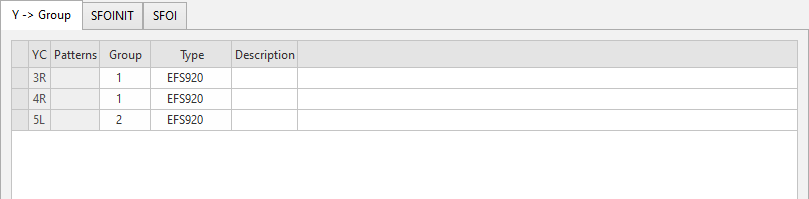
You make the following settings on the Y -> 组 tab:
|
YC |
显示导纱器组分配。 |
|
新花型 |
显示组分配的花型。 |
|
组 |
设定一个具有相同设置的送纱器组 |
|
型号 |
设定组合的送纱器类型。 The basic setting for the feed wheel type is made in the 配置 dialog box / 机器属性 tab / 电子送纱器 section. If you have made the following selection in Configuration: If you select the CAN BTSR in Configuration, then only the selection ULTRAFEED appears in the Setup data. |
|
说明 |
有关条目应用的注释。 您可以在这里输入文本。 |