Prepare the Color Sequence
Create a new row with two sub-rows in the Knitting Ranges table.Create a new row with
three sub-rows in the Knitting Ranges table.
One sub-row for each colored stripe.
- In the Parameter ribbon select the
 Knitting Modes symbol.
- The Knitting Ranges tool window appears.
- Enter the text Colored Stripes in the Description column of the first row.
- Open the context menu for the row number.
- Select Add Sub-row.
- A sub-row appears.
- Go to the sub-row.
- Enter the text Stripe 1 in the Description column.
- Select the 3 yarn color in the
 column.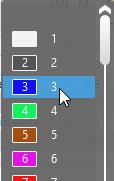
- Select the Stitch v, with Transfer option in the Filling element
 column.
- Activate the check box in the
 Round to Courses column.
- Select the Stripe Height formula in the
 column.
- [Stripe Height] = [Length]/20
Therefore, the height of this stripe is 1/20 of the body height. - Select the stitch density prepared for the stripe in the
 column.
- Go to the main row.
- Open the context menu for the row number.
- Select Add Sub-row.
- A second sub-row appears.
- Go to the new sub-row.
- Enter the text Stripe 2 in the Description column.
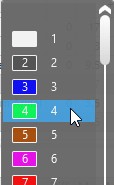
- Select the 4 yarn color in the column.
- Select the Stitch v, with Transfer option in the Filling element column.
- Activate the check box in the Round to Courses column.
- Select the Stripe Height formula in the column.
- [Stripe Height] = [Length]/20
Therefore, the height of this stripe is 1/20 of the body height. - Select the stitch density prepared for the stripe in the column.
- Go to the main row.
- Enter 20 as repetition value for the entire stripe area in the Quantity column.
 Note
Note
Value of repetitions should be as big as it is necessary in order to extend the colored
stripe area in both directions even over the longest fabric piece.
|
Description |
|
Filling Element |
|
Quantity |
|
|
|
|---|---|---|---|---|---|---|---|
|
Colored Stripe |
20 |
||||||
|
Stripe 1 |
|
Stitch v, with Transfer |
|
[Stripe Height] |
Stripe |
||
|
Stripe 2 |
|
Stitch v, with Transfer |
|
[Stripe Height] |
Stripe |
||


