Add the Fabric Pieces for Collar and Armhole Cuff
How to add the Collar fabric piece:
- Open the context menu in the background of the dimensioning view.
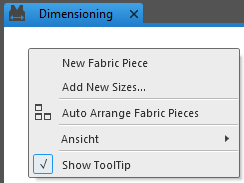
- Select New Fabric Piece.
- A new edit box with the New Fabric Piece 1 title appears.
- Open the Fabric Pieces and Sizes tool window.
- Open the context menu on the fabric piece New Fabric Piece 1
- Select Rename....
- The text box is activated as edit box.
- Enter the text Collar in the edit box.
- The title in the new edit box is Collar now.
 |
To add the armhole cuff fabric piece proceed the same way.
|