Shape Element Properties
Call up the Shape Element Properties dialog box by the Properties context menu of the active shape element.
 Call up the Shape Element Properties dialog box for each other shape element by re-call of the Properties context menu.

Elements in the dialog box:
Type
-
Types of shape elements:
-
 Gore
Gore -
 Hole
Hole -
 Dart
Dart -
 Within Shape
Start of stepping calculation of height
 Shape Element
Steps in the height are calculated starting from the shape element.
Basic Shape
Steps in the height are calculated starting from the basic shape.
Filling Options
Referred to Startpoint
-
Shape Element
Steps in the height are calculated starting from the shape element. -
Basic Shape
Steps in the height are calculated starting from the basic shape. -
X offset by stitches
-
Y offset by stitches
Fill
-
Face
-
Filling Element
-
Pattern Color
-
Motif

-
Height
-
Width
You can change the color map via the Image Import dialog box.
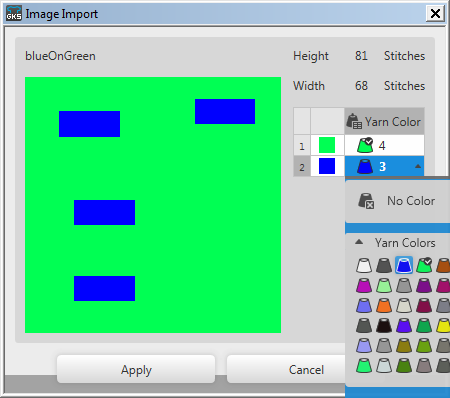
-
Border free
-
Border exact
-
Cover Border
Starting Row of the Shape Element
-
Divider [rows]

Define the rhythm of the steppings -
Offset

Define the distance to the starting row
Border Options
-
Filling Element
-
Pattern Color
-
Orientation
-
Inside of border
-
Outside of border
-
Width of border by stitches
-
At the Left
-
At the Right
-
At the Top
-
At the Bottom