Create a Formula for the Width of the Armhole Cuffs
How to calculate the width of the armhole cuffs:
The width of the armhole cuffs are calculated doubling the sum of length of the following armhole segments:
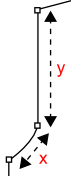
[Width of the Armhole Cuff] = 2*(x+y)
-
Calculation of x:
x is calculated according to the theorem of Pythagoras.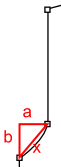
x² = a²+b²
x = √(a²+b²)
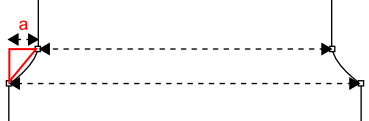
a = ([Body Width at the Waistband]-[Shoulder Width])/2
b = [Height of the Armhole Narrowing]
x = √((([Body Width at the Waistband]-[Shoulder Width])/2)²+[Height of the Armhole Narrowing]²)
-
Calculation of y
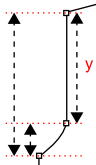
y = [Armhole Drop]–[Height of the Armhole Narrowing]
Formula for the width of the armhole cuffs:
The final formula for the width of the armhole cuffs results replacing the calculation
of x and y in the original formula.[Width of the armhole cuffs] = 2*(√((([Body Width at the Waistband]-[Shoulder Width])/2)²+[Height
of the Armhole Narrowing]²)+[Armhole Drop]–[Height of the Armhole Narrowing])
How to create the formula:
- The Dimensions
 tool window is open.
- Open the context menu of the Row No. column of the Formula table.

- Select Add Main Row.
- The pop-up window Formula Editor appears.
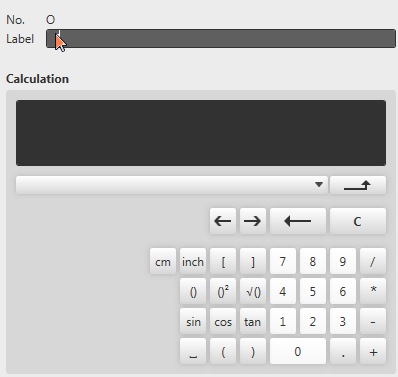
- Enter the text Width of Armhole Cuffs as label.
- Click the 2 and * buttons.
- The entry in the Calculation field is: 2*
- Click the () button.
- The entry in the Calculation field is:
2*() - Click the √() button.
- The entry in the Calculation field is:
2*(Sqrt()) - Click the ()² button.
- The entry in the Calculation field is:
2*(Sqrt(Pow(,2))) - Click the () button.
- The entry in the Calculation field is:
2*(Sqrt(Pow((),2))) - Select the Body Width at the Waistband dimension in the list box.

- The entry in the Calculation field is:
2*(Sqrt(Pow(([Body Width at the Waistband]),2))) - Click the - key.
- The entry in the Calculation field is:
2*(Sqrt(Pow(([Body Width at the Waistband]-),2))) - Select the Shoulder Width dimension in the list box.
- The entry in the Calculation field is:
2*(Sqrt(Pow(([Body Width at the Waistband]-[Shoulder Width]),2))) - Click the → button.
- The cursor in the Calculation field is positioned before the , (comma).
- Click the / and 2 buttons.
- The entry in the Calculation field is:
2*(Sqrt(Pow(([Body Width at the Waistband]-[Shoulder Width])/2,2))) - Click the → button three times.
- The cursor in the Calculation field is positioned before the second-last ).
- Click the + and ()² keys.
- The entry in the Calculation field is:
2*(Sqrt(Pow(([Body Width at the Waistband]-[Shoulder Width])/2,2)+Pow(,2))) - Select the Height of the Armhole Narrowing dimension in the list box.

- The entry in the Calculation field is:
2*(Sqrt(Pow(([Body Width at the Waistband]-[Shoulder Width])/2,2)+Pow([Height of the Armhole Narrowing],2))) - Click the → button four times.
- The cursor in the Calculation field is positioned before the last ).
- Click the + button.
- Select the Armhole Drop dimension in the list box.
- The entry in the Calculation field is:
2*(Sqrt(Pow(([Body Width at the Waistband]-[Shoulder Width])/2,2)+Pow([Height of the Armhole Narrowing],2))+[Armhole Drop]) - Click the - key.
- Select the Height of the Armhole Narrowing dimension in the list box.
- The entry in the Calculation field is:
2*(Sqrt(Pow(([Body Width at the Waistband]-[Shoulder Width])/2,2)+Pow([Height of the Armhole Narrowing],2))+[Armhole Drop]-[Height of the Armhole Narrowing]) - Confirm with
 .
.
- The Formula Editor closes.
- A row with the Width of the Armhole Cuffs formula is added at the bottom of the Formula table.