Sintral / Jacquard
The data of this column has the column header  .
.
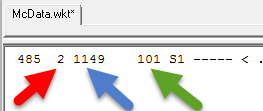
After executing the function, the Sintral line number and the jacquard line number are displayed analogously to the WKT file in the control column. : The WKT file can be called-up in the / / / menu.
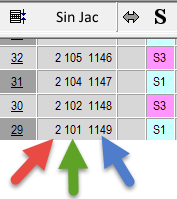
Example of the line numbers for a divided pattern.
- 2
Second partial pattern (*-1.sin and *-1.jac) - 101
Sintral Line Number in *-1.sin - 1149
Jacquard Line Number *-1.jac
Recalculate jacquard line numbers in the Jacquard editor:
- 1
- Right-click on the column.
- 2
- Run the function.
- The Number rows dialog box, in which you specify the starting line and the step width for the new numbering of the jacquard lines, appears.
Number rows