Show Racking
With this function the presentation of the transfer actions shown in the racking is switched over to the real state of the machine.
Display transferring in racking as needle bed racking:
- The technical view of the pattern is active.
- - or -
- The Symbol View of the technical pattern is active.
- 1
- Run the function in the context menu of the View.
- All the technical rows with the needle action transfer will be switched to the needle bed racking. The needle bed is displayed racked. The delivering and receiving needle are opposite to each other.
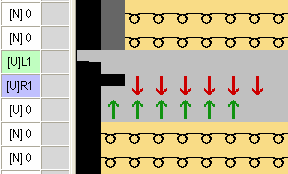
For racking patterns you can copy the state on the machine step by step with this function and function in the context menu of the technical view.
The enabled function is displayed with a check mark. Running the function again leads to deactivation, whereby the racking is visible in the needle action transfer again.
The function setting is saved with in the same menu.